
Screenshots
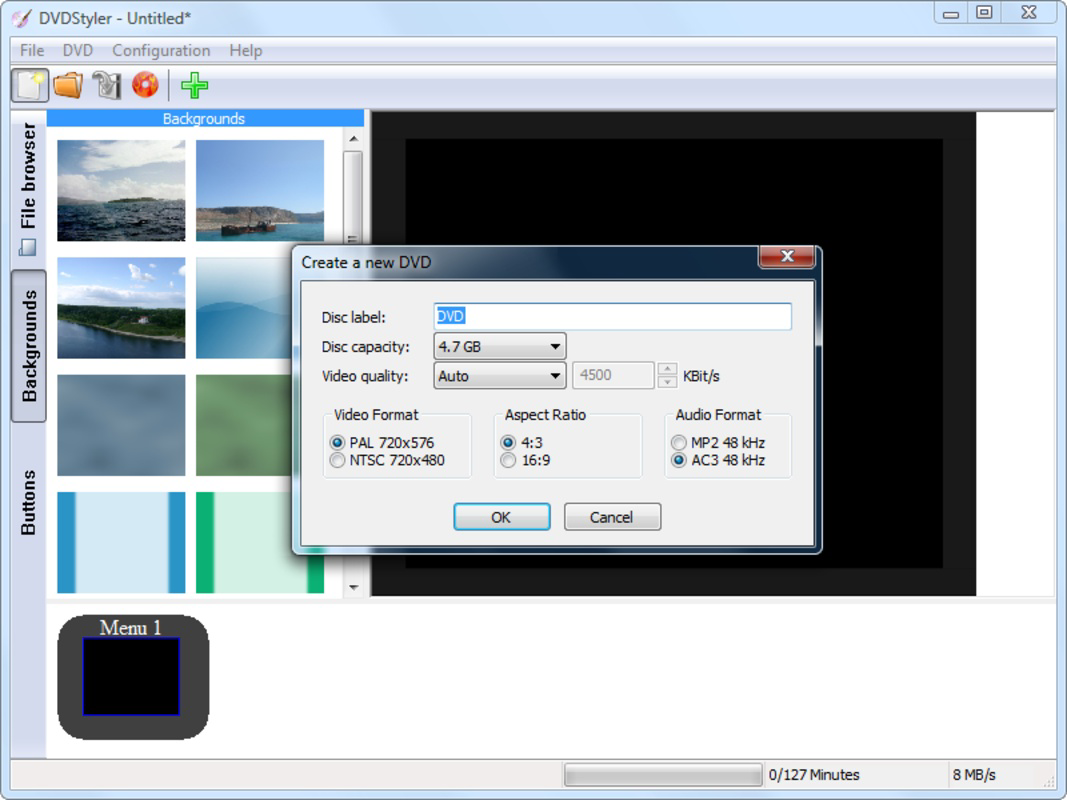
App details
- Updated
- Jun 15, 2023
- Language
- English
- Developer
- PortableApps.com
- Category
- Mobile
SoftPas in:
This product is also available in the following languages:
About DVDStyler Portable
Download DVDStyler Portable – DVD Creation, Custom Menus, Portable Tool
Overview
DVDStyler Portable is a streamlined utility designed for users seeking to create personalized, professional-grade DVD menus without the need for installation. The app serves as a digital toolkit for organizing video content, enabling users to structure movies, presentations, or personal recordings into navigable DVD formats. Its primary purpose is to simplify the process of DVD authoring by offering customizable interfaces and intuitive controls, making it accessible even to those with limited technical experience. The application is particularly useful for educators, content creators, and families looking to archive home videos or share media in a structured format.
By allowing users to embed custom backgrounds, interactive buttons, and chapter markers, DVDStyler Portable enhances the presentation quality of digital content. The portability feature ensures that users can work across different computers without altering system settings or leaving behind configuration files. This makes it ideal for collaborative environments or users who frequently switch between devices. The app fills a niche in the digital media ecosystem by providing a lightweight alternative to full-featured but complex DVD authoring suites.
Although the developer did not provide additional technical details, the app’s focus on ease of use and flexibility suggests a targeted approach to content creators who value control and convenience. Real-world applications include creating training modules, family video compilations, or media libraries for educational institutions. The app’s ability to function independently of system installation reinforces its role as a reliable, on-the-go solution for DVD production.
Key Features & Functionality
- Custom Background Images: Users can assign any image as a background for their DVD menu, allowing for personalized branding or thematic design. This feature is ideal for creating visually cohesive presentations, such as event recordings or branded training videos.
- Interactive Menu Buttons: Each button can be linked to specific video files or chapters, enabling viewers to navigate content intuitively. This functionality streamlines access to different sections of a DVD, improving user experience and reducing confusion.
- Real-Time Previewing: As changes are made to the menu layout or design, users can instantly view the results without rendering the entire disc. This accelerates the design process and reduces trial-and-error, especially when fine-tuning visual elements.
- Chapter Division for Movies: Users can split long video files into logical segments, allowing viewers to jump between scenes or sections. This feature is essential for organizing feature-length films or lecture series into digestible parts.
- Portable Usage: The application runs directly from a USB drive or external storage, preserving all settings and project files. This makes it suitable for use in shared or restricted environments where software installation is not permitted.
For example, a teacher could create a series of educational videos with chapter markers and a branded menu, then distribute them via USB to students. Similarly, a family might compile a vacation video with custom backgrounds and navigation buttons for easy playback on any DVD player.
Interface, UX & Performance
DVDStyler Portable features a clean, functional interface that prioritizes accessibility over visual complexity. The layout organizes core tools—backgrounds, buttons, chapters, and preview—into clearly labeled panels, allowing users to navigate the workflow intuitively. Visual design is minimalistic, focusing on usability rather than decorative elements, which helps reduce cognitive load during the creation process.
Navigation is linear and consistent, guiding users through the steps of menu creation, content linking, and previewing. The real-time preview function enhances the user experience by eliminating guesswork, enabling immediate feedback on design choices. Although the developer did not list formal performance metrics, the app appears optimized for responsiveness on standard desktop systems, with minimal lag during menu editing and previewing.
Stability is maintained through the portable design, which isolates the application from system-level conflicts. Users can expect consistent behavior across different machines, provided the host system supports the required runtime environment. Compatibility with standard DVD players is implied through the use of widely adopted authoring standards, though specific player testing was not disclosed.
Platform Compatibility & Technical Requirements
DVDStyler Portable is designed for use on Windows-based systems. The application is available as a standalone executable, allowing direct execution without installation. The file size is approximately 25.7 MB, making it lightweight and easy to store on portable drives.
The developer did not specify minimum OS requirements or version compatibility. However, based on its release date in 2023, it is likely compatible with modern Windows versions, including Windows 10 and Windows 11. The absence of installation steps suggests that the app relies on standard system libraries, reducing dependency conflicts.
Compatibility information was not fully disclosed, so users should verify system compatibility before use. The app’s portability implies it can be run on any computer with a compatible Windows environment, provided no restrictions prevent execution.
Pros and Cons
Pros
- Portable design allows use on any computer without installation.
- Real-time preview enhances design accuracy and reduces iteration time.
- Custom background and button functionality support creative expression.
- Chapter division improves navigation and user experience.
- Lightweight file size makes it easy to store and transfer.
Cons
- Platform availability is limited to Windows only.
- Developer did not provide detailed system requirements.
- No support for modern video formats beyond standard DVD compatibility.
- Interface may appear outdated to users accustomed to modern design trends.
- Limited feedback on performance across different hardware configurations.
FAQ
Is DVDStyler Portable safe to download and use?
Yes, the application is designed as a standalone tool with no known malware. It runs without installation, minimizing system impact. Users should download it from trusted sources to ensure integrity.
Can I use DVDStyler Portable on macOS or Linux?
The developer did not specify support for macOS or Linux. The app is intended for Windows systems, and there is no official version available for other platforms.
Do I need to install anything to run the app?
No, DVDStyler Portable is designed to run directly from a USB drive or local folder. No installation or registry changes are required.
What video formats are supported?
The app supports standard DVD-compatible formats such as MPEG-2 and AVI. Advanced or modern codecs may not be compatible without prior conversion.
How do I update DVDStyler Portable?
Updates are typically released by the developer through official channels. Users should check the official website or distribution site for the latest version.
Final Thoughts + CTA
DVDStyler Portable stands out as a focused, efficient tool for users who need to create professional DVD menus without the overhead of installation or complex software. Its portability, combined with customizable design features and real-time preview, makes it a practical choice for educators, content creators, and families organizing digital media. While it lacks cross-platform support and modern UI polish, its core functionality is robust and reliable.
For anyone looking to convert video content into structured, navigable DVDs with minimal setup, this app delivers clear value. The ability to carry your projects and settings on a USB drive adds a layer of flexibility that few similar tools offer. Whether you're archiving memories or distributing educational material, DVDStyler Portable ensures your content is presented with clarity and style.
Download DVDStyler Portable now
Guides & Tutorials
How to install DVDStyler Portable
- Click the Download button above.
- Once redirected, accept the terms and click Install.
- Wait for the DVDStyler Portable download to finish on your device.
How to use DVDStyler Portable
This software is primarily used for its core features described above. Open the app after installation to explore its capabilities.
User Reviews
No reviews yet. Be the first to share your experience.
You may also like
more
Que no te pillen¡
About !Que no te pillen¡Reviewed by Jason A. BilbreyShow MoreShow Less

3D Combat Zone
About 3D Combat ZoneOriginally released in 1983, 3D Combat Zone immerses players...

666: El día del portal
About 666: El día del portalOn June 6, 2006, Agent P. Stone uncovers a sinister...

80 in 1 Best Flash games
About 80 in 1 Best Flash games 80 in 1 Best Flash games is a collection of 80 fl...

ABYSS SEEKERーーWhat Do You See Deep in The Abyss
About ABYSS SEEKERーーWhat Do You See Deep in The AbyssIn ABYSS SEEKER, players...

ACA NEOGEO THE KING OF FIGHTERS 2002 for Windows
About ACA NEOGEO THE KING OF FIGHTERS 2002 for WindowsTHE KING OF FIGHTERS 2002,...